

To sell products via an Instagram payment link, you create a hosted checkout link with a payment processor and put it in your bio, Stories, or DMs. Instagram only sends the buyer away; it does not process the sale. The distinction that matters is who owns the checkout. A rented one takes a cut of every order, while one tied to your own Stripe account costs only processing fees.
TL;DR:
- Instagram is the shop window; the payment link is the cash register. You need a professional account plus a link to a hosted checkout page.
- Send buyers straight to a single-product payment link when you sell one thing. Use a small menu page only when you sell several.
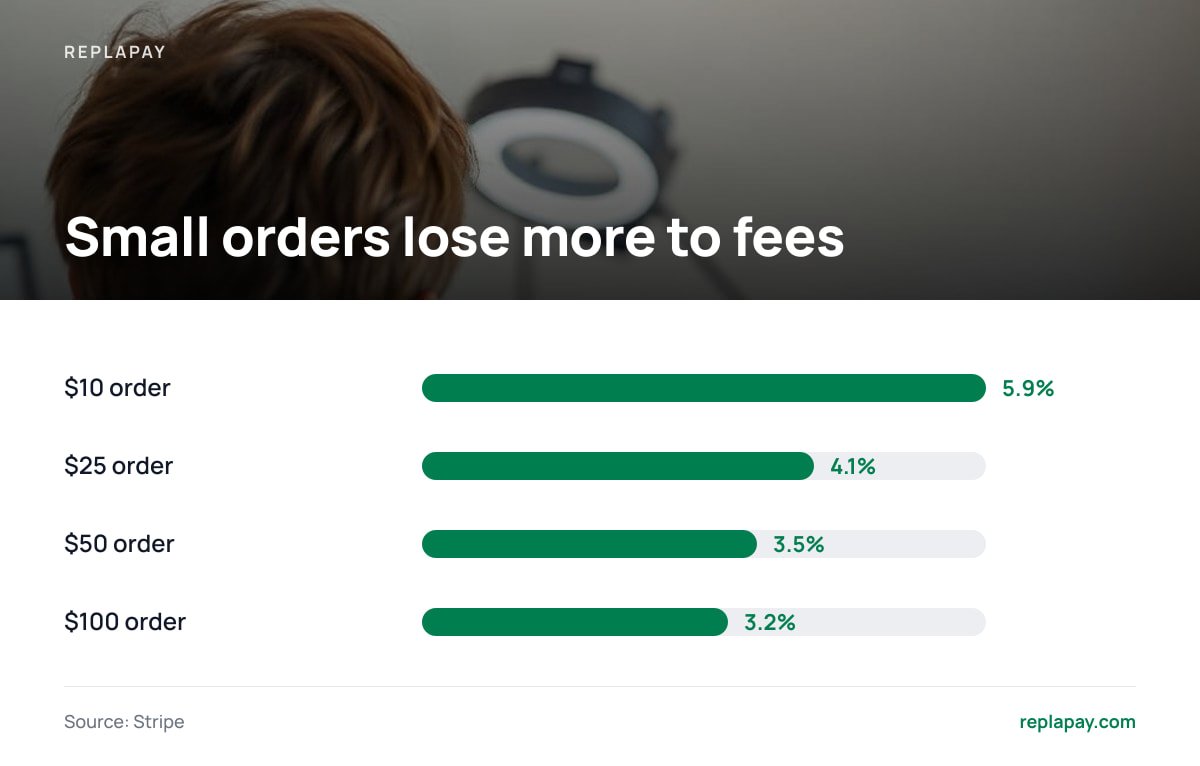
- On Stripe's standard US card pricing, a $10 sale loses 5.9% to fees and a $100 sale loses 3.2%, so small orders are the expensive ones.
- Digital products sell fine on Instagram, but you own the tax and delivery work unless a platform handles it for you.
- Never build a business on buying or selling accounts, usernames, or followers. Instagram's terms prohibit it.
Table of Contents
- Why the Link Is the Checkout, and Instagram Is Only the Storefront
- How to Sell Products via an Instagram Payment Link, Step by Step
- Where the Link Goes: Bio, Stories, DMs, and Reels
- What a Sale Actually Costs: Selling on Instagram Fees, With Real Numbers
- Can You Sell Digital Products on Instagram? Yes, With Two Catches
- How to Sell an Item Using PayPal, and When I Would Not
- The 5-3-1 Rule and Other Posting Formulas: What Is Real
- Selling Followers, Accounts, and Usernames: The Wrong Side Business
- Get a Checkout You Own Instead of Paying a Cut on Every Instagram Sale
- Frequently Asked Questions
- Sources
Why the Link Is the Checkout, and Instagram Is Only the Storefront
Instagram is where people discover what you sell. It is not where they pay. Your posts, Reels, and Stories create the intent, and a link carries that intent to a page that can take a card. Anything that adds steps between the tap and the payment form costs you buyers.
That makes the checkout decision the one that matters. You can send people to a full store, to a page on someone else's platform that keeps a percentage, or to a payment link tied to your own processor account. If you sell fewer than ten items a month, any of them works. Past that, the structure of the fee starts to matter more than the design of the page. Our breakdown of free payment link generators versus owning yours covers where that line falls.
How to Sell Products via an Instagram Payment Link, Step by Step
Here is the full path, from nothing to a first sale.
- Create the account. Download the Instagram app and sign up with an email or phone number. Pick a username that matches what you sell, since it is hard to change once people know you. You must be at least 13 to use Instagram.
- Switch to a professional account. In Settings, look for the option to switch account type, then choose Business or Creator. Choose Business if you sell products, because it gives you contact buttons and category labels. Menu names shift between app versions, so look for "professional account" rather than an exact path.
- Connect a payment processor. Open a Stripe account and verify your identity and bank details. Stripe Payment Links let you create a hosted checkout page for a product without writing code or running a website. If you have no site at all, our guide to creating a payment link without a website walks through it.
- Create one link per product. Set the name, price, and image. Turn on shipping address collection for physical goods. Add a quantity selector only if buyers will actually want more than one.
- Place the link where people tap. Instagram lets you add up to five links to your bio, and the link sticker works in Stories. Captions on regular posts and Reels are not clickable.
- Test the whole path on your phone. Buy your own product with a real card, then refund it. Most broken Instagram checkouts fail on mobile, not on desktop.
A single-product payment link removes the cart, the account signup, and the store page. That is three steps fewer than a normal store between the tap and the card form.
Where the Link Goes: Bio, Stories, DMs, and Reels

Not every placement converts equally, and you control more of it than you think.
| Placement | Best for | Weakness |
|---|---|---|
| Link in bio | Evergreen products, one flagship offer | One tap away from the post, so you must say "link in bio" aloud |
| Story link sticker | Launches, limited drops, restocks | Disappears after 24 hours unless saved to Highlights |
| Direct message | High-ticket or custom items, buyers who ask "how do I order?" | Manual, so it doesn't scale past a few dozen a week |
| Reel or post caption | Awareness only | Links in captions are not clickable |
My pick: put your best-selling product's direct payment link in the bio, and answer every "price?" comment by DM with the exact link. A buyer who has asked a question is warmer than any follower, and a DM link has zero competing options on the page.
What a Sale Actually Costs: Selling on Instagram Fees, With Real Numbers

Instagram charges nothing to use a link. The cost sits in the processor. Stripe's published US pricing for standard online card payments is 2.9% plus 30 cents per successful charge. Cards issued outside the US add 1.5%, and currency conversion adds 1%. Check the page before you commit, since pricing changes.
Here is what the fixed 30 cents does to small orders:
| Order size | Fee at 2.9% + $0.30 | Effective rate |
|---|---|---|
| $10 | $0.59 | 5.9% |
| $25 | $1.03 | 4.1% |
| $50 | $1.75 | 3.5% |
| $100 | $3.20 | 3.2% |
A $10 sale on standard Stripe pricing loses 5.9% to fees before any platform adds its own cut.
This is the case where the obvious answer is wrong. Many sellers treat the percentage as the number to compare. For Instagram sellers with low-priced items, the fixed fee dominates. If your average order is under $25, bundle products or set a minimum quantity instead of chasing a cheaper processor.
The "free" version of this setup is a processor account with no monthly fee, where you pay only per transaction. If a platform sits on top and keeps another 5-13%, that is the real expense. Our comparison of a merchant of record against your own Stripe account shows when that extra cut buys you something worth having.
Can You Sell Digital Products on Instagram? Yes, With Two Catches

You can, and digital products often suit Instagram better than physical ones. There is no shipping cost, no inventory, and delivery is instant after payment. Templates, presets, ebooks, and course access all sell this way.
The two catches are:
- Tax. Selling digital goods to buyers abroad can trigger VAT or sales tax obligations, and a payment link alone does not file anything for you. Stripe offers a tax calculation add-on, but registration and filing remain your job unless a merchant-of-record service handles it. That service charges more per sale for taking over that job.
- Delivery. The link must deliver the file or access automatically. If you email files by hand, you will eventually forget one, and the refund request that follows costs more than the sale.
Physical goods have their own rule. The FTC's Mail, Internet, or Telephone Order Merchandise Rule requires US sellers to ship within the time they advertise, or within 30 days if they state no time, and to offer a refund or a chance to cancel if they cannot. Put a ship date on your payment page.
How to Sell an Item Using PayPal, and When I Would Not
The process is short. Log in to a PayPal business account, create a payment link or button (or send an invoice) for the item and price, and paste that link into your bio or DM. Choose the goods-and-services option rather than friends-and-family, because only the former carries seller and buyer protection. Fees and the percentages involved vary by country, so read them in your account before setting prices.
It works, and it is the fastest start if your customers already trust it. I would still pick a card-first checkout tied to your own Stripe account as the main link. Buyers who tap a link in Instagram's in-app browser do best with a single form that offers a card and Apple Pay or Google Pay where available, not a login wall. Offer PayPal as a second option, not the only one.
The 5-3-1 Rule and Other Posting Formulas: What Is Real
The "5-3-1 rule" is not an Instagram policy. It is a community content-planning heuristic, and versions differ. The most common reading is five feed posts, three Stories sets, and one Reel per week. Others apply it to ratios of content types. Treat it as a cadence to start from, not a rule the algorithm enforces.
What matters for sales is that your content leads to the link on a schedule. Pick a rhythm you can keep for 90 days. A seller who posts three times a week for a quarter beats one who posts daily for ten days.
Pro Tip: Create a separate payment link for each place you promote, such as one for your bio and another for Story stickers, and use a different link name in your processor dashboard. After 30 days you will know which placement produces paid orders, not just taps. Most sellers only see the total and keep spending effort on the wrong surface.
Selling Followers, Accounts, and Usernames: The Wrong Side Business
People search for how to sell Instagram followers, accounts, or usernames, and for what a page might fetch. I will not give a price, because there is no reliable public market, and the activity breaks the platform's rules. Instagram's Terms of Use say you cannot attempt to buy, sell, or transfer any aspect of your account, including your username. A buyer who pays for an account can lose it, and so can you.
The better asset is the audience you can reach without the account: an email list and a customer record in your own Stripe dashboard. That survives a ban. A purchased follower count does not, and fake followers lower your engagement rate, which hurts the posts that sell.
Get a Checkout You Own Instead of Paying a Cut on Every Instagram Sale
If your Instagram orders are growing, the cost to watch is the percentage a marketplace-style platform keeps on top of card fees. ReplaPay is a self-hosted checkout license, $299 once, that sends card and crypto payments straight into your own Stripe account and wallet. It includes payment links for each product, Bitcoin, Lightning, and stablecoin support, a Stripe fee calculator, 12 months of updates, and 30 days of setup support.
The math is simple. If a platform keeps about 10% and you would otherwise pay roughly 3% to Stripe, you are giving up around 7 points, so $299 pays back near $4,300 in sales. The caveat is that self-hosting means you run the page and handle sales tax or VAT yourself. If you sell a few hundred dollars a month, a plain Stripe Payment Link is the cheaper place to start.
Frequently Asked Questions
What is the 5-3-1 rule on Instagram?
It is an informal content-planning guideline, not an Instagram rule. A common version is five feed posts, three Story sets, and one Reel per week, though versions vary. Use it as a starting schedule and adjust to what you can keep up for at least 90 days.
Can you sell digital products on Instagram?
Yes. Share a payment link in your bio, Stories, or DMs, and use a checkout that delivers the file or access automatically after payment. You are responsible for any VAT or sales tax on digital sales unless a merchant-of-record service handles it.
How can I sell an item using PayPal?
Use a PayPal business account to create a payment link, button, or invoice for the item and price, then share it in your bio or DM. Pick the goods-and-services option so the buyer and seller protections apply. Fees vary by country, so check them in your account.
How do I create an Instagram account to sell products?
Sign up in the app with an email or phone number, choose a username, then switch to a professional account in Settings. Pick Business if you sell products. Add your payment link to the bio once your processor account is verified.
How do I sell products via an Instagram payment link for free?
Creating the link costs nothing with a processor that has no monthly fee, such as Stripe, which charges per successful transaction. The only costs are those per-sale fees. A paid platform layered on top is optional and adds its own percentage.
Can I sell my Instagram account or username?
Instagram's Terms of Use prohibit buying, selling, or transferring any aspect of an account, including the username. Doing it risks losing the account, so build assets you control, like an email list, instead.
Sources
- Stripe Payment Links | Stripe
- Stripe Pricing | Stripe
- Business Guide to the FTC's Mail, Internet, or Telephone Order Merchandise Rule | Federal Trade Commission
- Instagram Terms of Use | Instagram Help Center