

To stop paying recurring fees for a checkout platform, first work out which kind of fee you are paying. A monthly subscription stops when you cancel it in your dashboard. A percentage cut taken from every sale keeps running for as long as your checkout lives on that platform, and it only stops when you move checkout to your own payment processor. For most sellers, that percentage is the larger of the two by a wide margin.
TL;DR:
- A "$0/month" checkout plan that takes 10% of each sale is still a recurring fee, and usually the most expensive one you pay.
- At a $40 average order, selling directly through Stripe costs about 3.65% all-in, against roughly 10% on a typical marketplace checkout.
- A $299 one-time license pays for itself after about $4,700 in sales at that fee difference.
- Leaving a merchant-of-record platform moves sales tax and VAT compliance onto you, so a few sellers should stay put.
- Buyers can stop automatic charges through Google Play, their Google Account, their bank, or their card issuer. In the US, the bank route requires notice at least three business days before the payment.
Table of Contents
- Two Kinds of Recurring Fees, and Only One Shows Up as a Subscription
- What Your Checkout Platform's Cut Actually Costs Per Year
- How to Stop Paying Recurring Fees for Your Checkout Platform, Step by Step
- When Leaving Your Checkout Platform Is the Wrong Call
- How to Deactivate Recurring Payments as a Buyer
- How to Legally Stop a Merchant From Automatically Charging Your Card
- What Is the Hardest Subscription to Cancel?
- Keep About 96 Cents of Every Dollar With a Checkout You Pay For Once
- Frequently Asked Questions
- Sources
Two Kinds of Recurring Fees, and Only One Shows Up as a Subscription

Checkout platforms charge you in two ways. The first is a subscription: $29, $49, or $99 a month, billed whether you sell anything or not. The second is a transaction fee: a percentage of every sale, often with a fixed per-order amount added on top. Both repeat. Only the first one looks like a subscription.
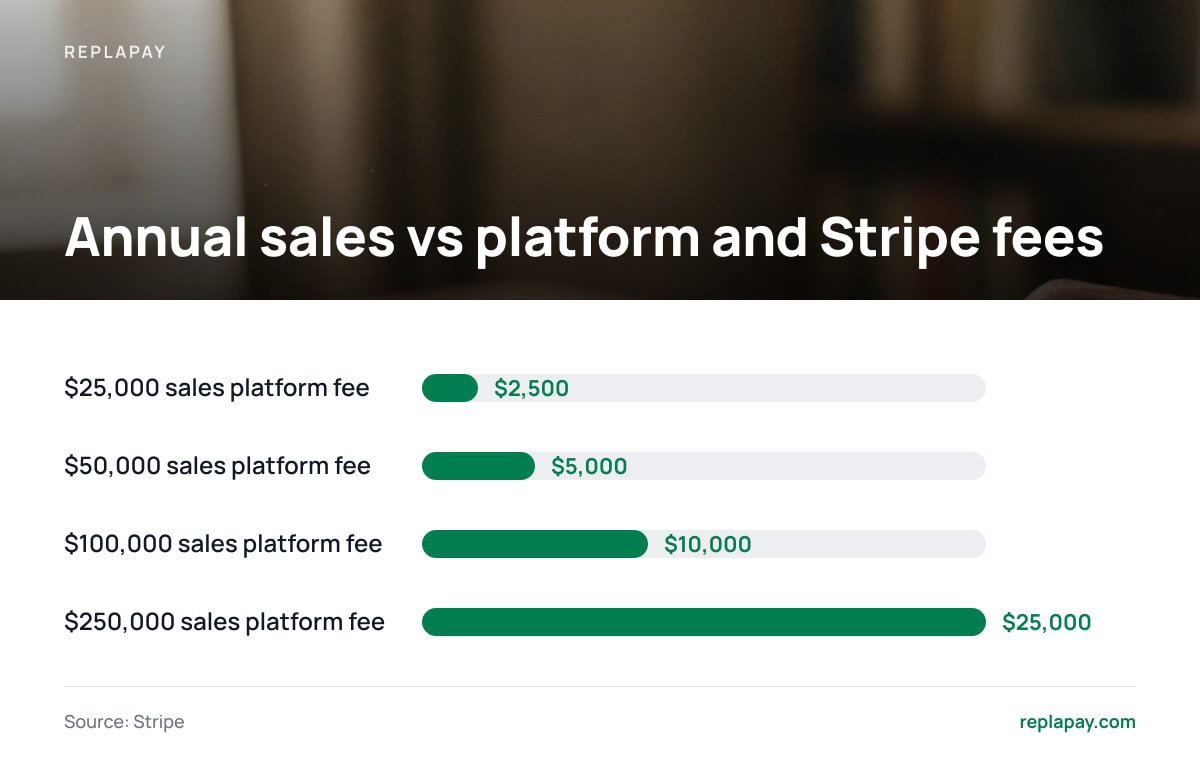
The percentage is the one sellers forget to count. A plan advertised as "free" that takes 10% of each sale is a recurring fee that grows as your revenue grows. Someone selling $100,000 a year on that plan pays $10,000 a year for checkout. Very few monthly subscriptions come close to that.
Canceling the monthly plan is easy: you click a button in your billing settings. Ending the percentage cut means your buyers have to pay somewhere else, either at a processor you control or at a cheaper platform. Everything below treats the percentage as the real target, because for anyone with meaningful volume, it is.
What Your Checkout Platform's Cut Actually Costs Per Year
The table compares a marketplace-style checkout that takes 10% all-in with selling directly through your own Stripe account. Stripe's published pricing for standard US domestic card payments is 2.9% plus 30¢ per successful charge. The figures assume a $40 average order.
| Annual sales | Orders at $40 | Platform at 10% | Direct Stripe (2.9% + 30¢) | Difference per year |
|---|---|---|---|---|
| $25,000 | 625 | $2,500 | $912.50 | $1,587.50 |
| $50,000 | 1,250 | $5,000 | $1,825 | $3,175 |
| $100,000 | 2,500 | $10,000 | $3,650 | $6,350 |
| $250,000 | 6,250 | $25,000 | $9,125 | $15,875 |
At a $40 order, direct Stripe processing works out to about 3.65% of revenue. The gap to a 10% platform is 6.35 percentage points, and that gap repeats on every sale for as long as you stay.
At a 6.35-point fee gap, a $299 one-time checkout license pays for itself after about $4,700 in sales. For most sellers, that happens in the first month or two.
Order size matters. The fixed 30¢ hurts small orders: on a $5 sale, it alone is 6% of the price. If your average order is under about $10, plug in your own numbers with a fee calculator before deciding anything. For a fuller breakdown of how one-time pricing compares over three and five years, see one-time license vs. SaaS fees.
How to Stop Paying Recurring Fees for Your Checkout Platform, Step by Step

The safest migration runs both checkouts side by side for a while. A hard switch is riskier.
1. Export everything before you change anything
Download your customer list, order history, license keys, and payout records. Ask your current platform in writing whether it supports a PCI-compliant export of stored card data to another processor. Many platforms won't do this, especially ones that act as the legal seller. If yours won't, your existing subscribers will have to re-enter their cards on your new checkout.
2. Open and verify your own Stripe account
Stripe verification can ask for business details, bank information, and sometimes documents. Finish this before you announce anything, so no sales go unprocessed while you wait.
3. Rebuild products and payment links
Recreate your products, prices, and any discount codes on the new checkout. If you also want crypto payments, set up your wallet now. Our guide to accepting Bitcoin on your website without losing a cut covers Lightning and stablecoin options.
4. Route new buyers first, migrate subscribers second
Point every new "Buy" button at the new checkout. Let existing subscriptions renew on the old platform until you have emailed those customers a re-subscribe link, ideally with a small incentive to switch.
5. Downgrade, don't delete
Move the old account to its cheapest or free tier and leave it open.
Pro Tip: Keep the old platform account active for at least four months after your last sale there. Card dispute windows commonly run around 120 days. If you close the account early, you can lose access to the evidence you need to fight a chargeback on an order the old platform processed, and you may still be on the hook for the loss.
When Leaving Your Checkout Platform Is the Wrong Call
Many marketplace checkouts act as a merchant of record. That means they are legally the seller, and they calculate, collect, and remit sales tax and VAT on your behalf. When you move to your own Stripe account, you become the seller, and that work moves to you.
The biggest exposure is digital goods sold to consumers in the EU. VAT is generally charged at the customer's country rate. Registering for the EU's One-Stop Shop scheme and filing quarterly returns is real, recurring work, even when the amounts are small. We walk through it with actual figures in merchant of record tax liability explained.
Here is our position. If you sell under roughly $5,000 a year, or most of your buyers are EU consumers and you have no appetite for VAT filings, stay on a merchant-of-record platform for now. The percentage costs money, but it pays for compliance you would otherwise do yourself. Past that point, the fee gap usually outweighs the cost of tax software or an accountant, and moving is the better call. If you are weighing the in-between options, we compare them in commission-free alternatives that actually work.
How to Deactivate Recurring Payments as a Buyer
Many people searching this phrase want to stop a subscription that charges them. You can turn off recurring billing in almost every case. Where you do it depends on how you pay.
Google Pay and Google Play subscriptions
For app and Play Store subscriptions, Google's Play help center explains the process. Open the Play Store, tap your profile icon, go to Payments & subscriptions, then Subscriptions, choose the subscription, and tap Cancel. Uninstalling the app does not cancel the subscription.
For other charges tied to your Google Account, sign in to your Google Account in any browser and open Payments & subscriptions. There you can review and manage subscriptions, saved payment methods, and recurring purchases.
On an iPhone
Google subscriptions are not managed in iOS Settings. On an iPhone, open Safari, sign in to your Google Account, and use the same Payments & subscriptions page. Subscriptions you bought through Apple are a different system: cancel those under Settings > [your name] > Subscriptions.
At your bank
To stop automatic payments from your bank account in the US, the Consumer Financial Protection Bureau says to contact your bank at least three business days before the scheduled payment. Your bank may ask you to confirm the request in writing within 14 days. Tell the company as well. Stopping the payment does not end the contract, and you could still owe what it says.
On a credit or debit card
Call your card issuer and ask it to block future charges from that merchant. If the merchant keeps charging after you have canceled with it, dispute those charges with the issuer.
How to Legally Stop a Merchant From Automatically Charging Your Card
The legal route has three steps.
- Cancel with the merchant in writing. Keep the confirmation email or a screenshot.
- Revoke the authorization with your bank or card issuer. Give the date you canceled.
- Dispute any charge made after that date.
Several laws back you up:
- United States, bank accounts. The Electronic Fund Transfer Act and Regulation E give you the right to stop preauthorized transfers from your bank account.
- United States, online subscriptions. The Restore Online Shoppers' Confidence Act, enforced by the FTC, requires online sellers using automatic renewals to give you a simple way to stop recurring charges.
- Euro area direct debits. Under the SEPA Direct Debit scheme run by the European Payments Council, you can ask your bank for a refund of an authorized core direct debit within eight weeks, without giving a reason.
- United Kingdom, recurring card payments. You can cancel a continuous payment authority by telling your card provider directly. The provider must stop the payments even if the merchant hasn't.
What Is the Hardest Subscription to Cancel?
No official ranking exists. Gym memberships, cable and satellite TV, and some streaming and shopping memberships come up again and again in consumer complaints, and regulators have taken notice. The FTC has brought cases under the Restore Online Shoppers' Confidence Act alleging that large companies built deliberately confusing cancellation flows. The best known is its case against Amazon over Prime, which involved a multi-page cancellation process.
For sellers, the hardest subscription to cancel is a different thing: the percentage fee that never calls itself one. It ends only when your buyers pay somewhere else.
Keep About 96 Cents of Every Dollar With a Checkout You Pay For Once

ReplaPay is self-hosted checkout software. You pay for it once, $299, and it sends card payments straight into your own Stripe account and crypto payments (Bitcoin, Lightning, and stablecoins) straight into your own wallet. There is no percentage on top. At a $40 average order, you pay only Stripe's processing fee, so you keep about 96 cents of every dollar instead of 90. The license includes payment links, 12 months of updates, and 30 days of setup support. Our free Stripe fee calculator will show your exact numbers before you buy.
The caveat: ReplaPay is not a merchant of record. It does not file your sales tax or VAT. If your buyers are mostly EU consumers and you sell at low volume, the tax section above may point you elsewhere for now. Self-hosting also means you run your own hosting. Check our spec sheet against your setup before you switch.
Frequently Asked Questions
Can you turn off recurring billing?
Yes. As a buyer, you can cancel in the merchant's account settings, in Google Play or your Google Account, or by revoking the authorization with your bank or card issuer. As a seller, you can cancel a platform's monthly plan in its dashboard, but its per-sale percentage stops only when you move checkout elsewhere.
How do I deactivate recurring payments in Google Pay?
For Play Store subscriptions, open Google Play, go to Payments & subscriptions, then Subscriptions, and tap Cancel on the one you want to end. For other Google charges, sign in to your Google Account in a browser and open Payments & subscriptions. On an iPhone, use that same page in Safari.
How do I stop automatic payments from my bank account?
In the US, notify your bank at least three business days before the scheduled payment. The bank may require written confirmation within 14 days. Cancel with the company too, because stopping the payment does not end your contract.
Do I owe sales tax if I leave a merchant-of-record checkout platform?
Usually you become responsible for collecting and remitting it, because you are now the legal seller. The biggest burden falls on sellers of digital goods to EU consumers, where VAT is generally charged at the buyer's country rate. Budget for tax software or an accountant before you switch.
How much do I save by moving from a 10% platform to direct Stripe processing?
At a $40 average order, direct Stripe processing costs about 3.65% of revenue, so you save roughly 6.35% of everything you sell. On $100,000 a year in sales, that comes to about $6,350.
Sources
- Pricing | Stripe
- Ask CFPB | Consumer Financial Protection Bureau
- Restore Online Shoppers' Confidence Act | Federal Trade Commission
- Cancel, pause, or change a subscription on Google Play | Google Play Help
- SEPA Direct Debit | European Payments Council