

You should own your checkout software instead of SaaS once your all-in platform fees cost more each year than a one-time license plus hosting. For most sellers doing a few thousand dollars a month, that point arrives within weeks. The fee savings are not the deciding factor, though. When you leave a merchant-of-record platform, you become responsible for sales tax and VAT. If you're ready to handle that, owning your checkout is the better deal.
TL;DR:
- At $5,000 a month in sales, an 8% all-in platform fee costs about $195 more per month than Stripe's standard US card rate on $25 orders.
- A $299 one-time license pays for itself in under two months at that volume, and in about eight months at $1,000 a month.
- Owning your checkout usually means you become the merchant of record, so sales tax and VAT become your job.
- If you sell digital products to EU consumers from outside the EU, there is no VAT threshold. Your first sale counts.
- Switch if you clear roughly $2,000 a month and can handle tax. Below that, or if tax compliance scares you, stay put for now.
Table of Contents
- The Real Cost of Renting Checkout, in Dollars per Month
- What You Take On When You Own Your Checkout Software Instead of SaaS
- The Tax Question Most Switchers Get Wrong
- Who Should Switch Now, and Who Should Wait
- Card and Crypto on One Checkout: Where Each One Earns Its Place
- How to Switch Without Losing a Month of Sales
- Keep Nearly Every Dollar of Every Sale for a One-Time $299
- Frequently Asked Questions
- Sources
The Real Cost of Renting Checkout, in Dollars per Month

Marketplace-style checkout platforms usually charge one all-in percentage per sale, often 5% to 13% depending on the platform and plan. A self-hosted checkout connected to your own Stripe account charges you only the payment processor's rate. In the US, Stripe's published pricing lists that rate as 2.9% + 30¢ per successful domestic card charge. The difference between those two numbers is what you're paying for convenience.
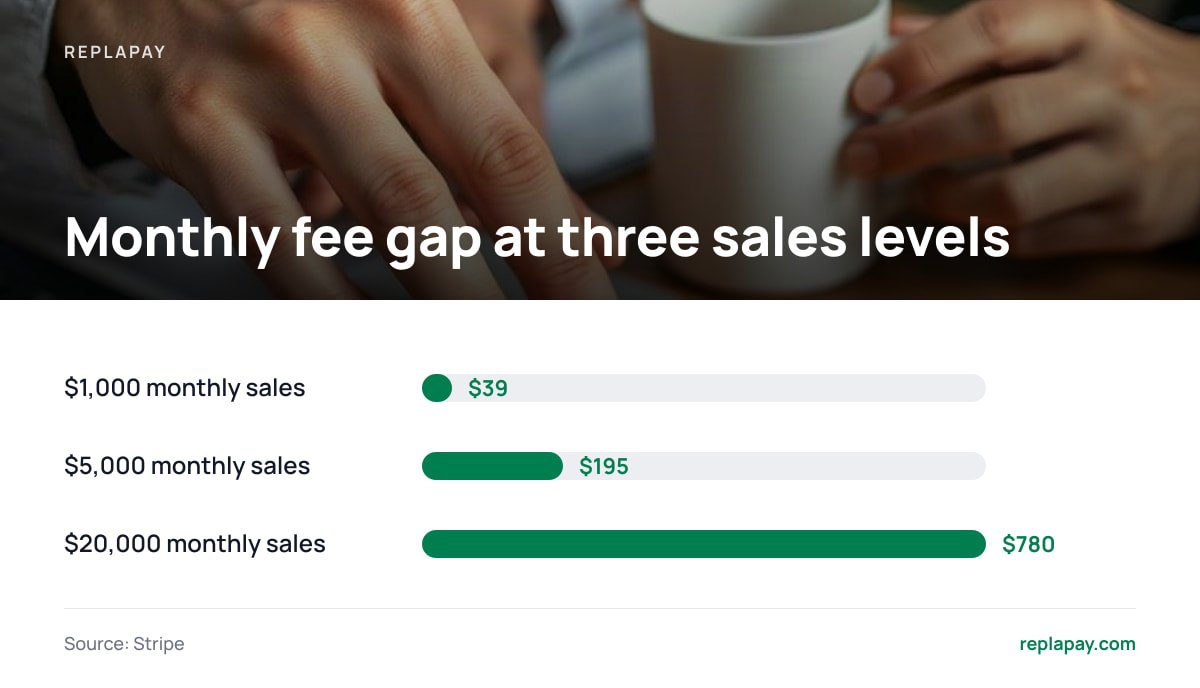
Here is what that gap looks like at a $25 average order. The comparison uses an 8% all-in platform fee, which sits near the middle of that range. It also assumes about $10 a month for hosting.
| Monthly sales | Orders | 8% platform fee | Stripe (2.9% + 30¢) | Monthly difference | Year-one net after $299 license + $120 hosting |
|---|---|---|---|---|---|
| $1,000 | 40 | $80 | $41 | $39 | +$49 |
| $5,000 | 200 | $400 | $205 | $195 | +$1,921 |
| $20,000 | 800 | $1,600 | $820 | $780 | +$8,941 |
At $20,000 a month, an 8% platform keeps $1,600. Stripe's standard rate on the same 800 orders is $820. The $780 gap is paid again every month you don't switch.
Two things move this math more than the headline rate does. Order size changes the flat 30¢ fee's share: on a $5 product, 30¢ alone is 6%. International cards cost more on Stripe. Its pricing page adds a surcharge for international cards and another for currency conversion. If most of your buyers are outside your home country, rerun the numbers with those surcharges included. We go through more order-size scenarios in the one-time vs. subscription cost breakdown.
What You Take On When You Own Your Checkout Software Instead of SaaS
The percentage you pay a marketplace platform covers more than processing. When you own your checkout, you take on four jobs the platform was quietly doing for you. None of them is hard. All of them are real.
Tax and merchant-of-record status
Many all-in platforms act as the merchant of record. That means the platform is legally the seller, so it collects and remits sales tax and VAT for you. When you run checkout through your own Stripe account, you are the merchant of record. That shift is the biggest change in the whole switch, and it gets its own section below.
PCI compliance scope
Card data security is governed by the PCI Data Security Standard, maintained by the PCI Security Standards Council. Suppose your checkout passes card entry to Stripe's hosted fields or hosted payment page, and card numbers never touch your server. Then you stay in the lightest compliance tier, usually a short self-assessment questionnaire. A self-hosted checkout should work this way. If a tool asks you to collect raw card numbers on your own server, don't use it.
Disputes and fraud
Chargebacks land on you. A platform that acts as merchant of record absorbs disputes, or at least handles them for you. On your own Stripe account, you respond to disputes yourself, and Stripe charges a dispute fee in addition to the reversed sale. Keep delivery records, license-key logs, and download timestamps. They are your evidence.
Hosting and uptime
Your checkout is now a server you run. A small virtual server or managed host handles checkout traffic for most creators easily. You are responsible for keeping it updated, backed up, and monitored. If the server goes down during a launch, nobody else is paged.
The Tax Question Most Switchers Get Wrong
Most people who switch focus on the fee savings and ignore tax until a buyer in Germany emails asking for a VAT invoice. Before you move, work out which tax rules apply to what you sell and where your buyers are.
EU VAT on digital products. The EU taxes digital services sold to consumers based on where the buyer is, not where the seller is. Since July 2021, the EU's VAT One Stop Shop lets you register in one member state and report VAT for all 27 through a single quarterly return. EU-based sellers get a €10,000 annual threshold for cross-border sales before destination-country VAT applies. Sellers based outside the EU get no threshold.
If you sell e-books, software, or courses to EU consumers from outside the EU, VAT applies from your first sale. There is no minimum.
US sales tax. In South Dakota v. Wayfair (2018), the US Supreme Court allowed states to require out-of-state sellers to collect sales tax once they pass a sales threshold. Each state now sets its own threshold, and each state decides whether digital goods are taxable at all. Most small creators won't pass any state's threshold for a while. Check every year anyway, because thresholds and digital-goods rules keep changing.
The practical fix. You don't need an accountant on day one. Stripe offers Stripe Tax as an add-on that calculates and collects tax at checkout based on the buyer's location. It costs extra per transaction, so include that cost in your fee math. You can also register for OSS yourself and file quarterly. That route is tedious but cheap. Either way, budget a few hours per quarter for tax work.
Who Should Switch Now, and Who Should Wait
Our position: if you clear about $2,000 a month and sell to buyers in a handful of countries, switch. At that volume you save over $900 a year at a $25 order size, which covers a license and a full year of hosting several times over.
Switch now if:
- You sell steadily at $2,000 or more a month. The payback period is under four months, and the savings keep adding up every month after that.
- Most of your buyers are in your home country. Tax setup is simpler, and you avoid Stripe's international surcharges on most orders.
- You already have an audience. Marketplace discovery features rarely drive meaningful sales for creators who bring their own traffic. You're paying for distribution you don't use.
Wait if:
- You make under $500 a month. The payback period is over a year, and your time is better spent on growth.
- You sell mainly to EU consumers and can't face quarterly VAT filing. Paying a merchant of record to handle this is a legitimate choice. Make it deliberately, not by default.
- You have hundreds of active subscriptions on a platform's own billing. Moving recurring billing is a real migration project. Plan it as one.
For a detailed per-product version of this calculation, see the real math on selling digital products without a marketplace cut.
Card and Crypto on One Checkout: Where Each One Earns Its Place

When you own your checkout, you decide which payment methods to accept. Platforms make that choice for you. Cards will be most of your volume. Crypto is a smaller channel, but it solves specific problems that cards don't.
Cards through Stripe are the default because buyers trust them and conversion is high. Your money goes into your Stripe balance and then pays out to your bank on your schedule. Nobody holds it as a middleman.
Bitcoin and Lightning suit buyers outside the card networks' reach or buyers who prefer them. Lightning settles in seconds with very low network fees, so it handles small purchases well where the 30¢ card fee would eat into your margin. Stablecoins let you take a dollar-pegged payment without exposure to price swings.
The trade-off is real. Crypto payments sent to your own wallet can't be charged back. That protects you from dispute fraud, but it also means refunds are manual. In most jurisdictions, crypto you receive is taxable income at its value on the day you receive it. Track it from the first payment.
Pro Tip: Before you take your first sale, set a custom statement descriptor in your Stripe account so it matches your product or brand name exactly. On a platform, the buyer's bank statement shows the platform's name. On your own account, it shows whatever you configure. A mismatch is a common cause of "I don't recognize this charge" disputes, and each one costs you the sale plus a dispute fee.
How to Switch Without Losing a Month of Sales
You don't need to switch all at once. Running the old and new checkouts side by side is safer and loses nothing.
- Activate and verify your Stripe account first. Identity and business verification can take a few days. Do it before you build anything.
- Decide your tax approach. Choose Stripe Tax, OSS registration, or both. Set it up before your first sale, not after.
- Install your checkout and create payment links for one low-stakes product. Make a real purchase yourself and refund it. Our guide to self-hosted payment links covers what changes in that workflow.
- Move new traffic first. Update links in your newsletter, site, and social bios. Leave existing customers' download access and renewals on the old platform for now.
- Export your customer list and license keys from the old platform while you still have full access.
- Run both for one full billing cycle. Then move any remaining subscribers, and close the old account only when its revenue reaches zero.
Comparing tools before you commit? Our buyer's comparison of self-hosted checkout tools lists the features worth checking.
Keep Nearly Every Dollar of Every Sale for a One-Time $299
ReplaPay is the self-hosted checkout this article describes. Card payments go straight into your own Stripe account. Bitcoin, Lightning, and stablecoin payments go straight into your own wallet. Your only ongoing fee is your processor's rate. The license costs $299 once and includes 12 months of updates and 30 days of setup support. You get payment links for both card and crypto, and a Stripe fee calculator so you can run the numbers from the table above against your own order sizes before you buy.
The honest limit: ReplaPay is not a merchant of record. It does not file your VAT or sales tax. Everything in the tax section above becomes your responsibility, whether you handle it through Stripe Tax or by filing yourself. If that's a dealbreaker, a merchant-of-record platform is still the better fit. If it isn't, you keep the percentage you've been paying someone else.
Frequently Asked Questions
How much revenue do I need before owning my checkout software makes sense?
At a $25 average order and an 8% all-in platform fee, a $299 one-time license pays for itself in about eight months at $1,000 a month and in under two months at $5,000 a month. Around $2,000 a month is a practical threshold for switching. Below $500 a month, the payback period is usually too long to be worth the setup time.
Do I have to handle sales tax and VAT if I self-host my checkout?
Usually, yes. A self-hosted checkout connected to your own Stripe account makes you the merchant of record, so collecting and remitting tax becomes your responsibility. Tools like Stripe Tax can calculate and collect it at checkout, and the EU's One Stop Shop lets you file EU VAT through a single quarterly return.
Is a self-hosted checkout PCI compliant?
It can be, as long as card details are entered into the processor's hosted fields or payment page and never touch your server. That setup keeps you in the lightest PCI DSS compliance tier, usually a short self-assessment. Don't use any tool that asks you to collect raw card numbers on your own server.
Can customers get refunds on crypto payments?
Not automatically. Crypto sent to your own wallet can't be charged back, so any refund is a manual payment you send back to the buyer. That eliminates crypto dispute fraud, but you need a clear refund policy and a record of every payment for tax purposes.
Will I lose sales while switching from a marketplace platform?
Not if you run both checkouts in parallel. Send new traffic to your own checkout, leave existing customers and renewals on the old platform for one full billing cycle, and export your customer list and license keys before you close the old account.
Sources
- Stripe Pricing & Fees | Stripe
- PCI Security Standards Council | PCI Security Standards Council
- VAT One Stop Shop | European Commission
- Stripe Tax | Stripe