

The best no subscription checkout software for creators is a one-time license you host yourself, connected to your own Stripe account. That way you pay only card processing, 2.9% + 30¢ on a standard US card, instead of a 5–13% platform cut. Watch out for tools that advertise "no monthly fee" but still take a percentage of every sale. That is a subscription that grows with your revenue. The trade-off of self-hosting is that you, not the platform, become responsible for sales tax and VAT.
TL;DR:
- A "no monthly fee" platform that takes a percentage of each sale still charges you a recurring cost, and that cost grows as your sales grow.
- At a $50 average price, Stripe's standard US rate works out to about 3.5% all-in, compared with 5–13% for a typical marketplace-style checkout.
- A $299 one-time license pays for itself in roughly 130–400 sales at $50, depending on what your current platform charges.
- Self-hosting makes you the merchant of record, so sales tax and VAT become your responsibility. Plan for that before you switch.
- Below about $10,000 a year in sales, or if you sell cheap items to many countries, staying on a merchant-of-record platform can still be the right call.
Table of Contents
- Two Kinds of "No Subscription," and Only One Saves You Money
- What a 5–13% Cut Costs at Real Sales Volumes
- The Trade-Off Nobody Advertises: Sales Tax, VAT, and Merchant of Record
- What No Subscription Checkout Software for Creators Should Include
- Card vs. Crypto: Where Each Payment Rail Earns Its Place
- Who Should Switch, and Who Should Stay Put
- How To Migrate Without Breaking Existing Customers
- Keep Every Sale Minus Stripe's Cut, for a One-Time $299
- Frequently Asked Questions
- Sources
Two Kinds of "No Subscription," and Only One Saves You Money
When you search for checkout software without a subscription, you will find two very different products using the same words.
Fee-per-sale platforms. These have no monthly bill, but they take a percentage of every transaction, often with a fixed per-order fee on top. They market themselves as free to start, and they are. They are not free to grow on. A seller doing $100,000 a year at an 8% effective rate pays $8,000 a year, every year, for the same checkout page.
One-time license software. You pay once, host the checkout yourself, and connect it to your own payment accounts. After that, the only per-sale cost is what your payment processor charges. There is no percentage going to the software vendor.
The first model is a subscription priced as a share of your revenue. The second is the only one that matches what most people mean when they type "no subscription." For a full breakdown of how the two pricing models compare over three and five years, see our one-time vs. subscription cost math.
Pro Tip: Don't trust the rate on any pricing page, including the one your current platform advertised when you signed up. Pull last month's payout report and calculate (gross sales − net payout) ÷ gross sales. That is your real effective rate. It includes the per-order fixed fees, currency conversion and payout charges that headline percentages leave out. Most sellers who run this number find it is 1–3 points higher than they thought.
What a 5–13% Cut Costs at Real Sales Volumes

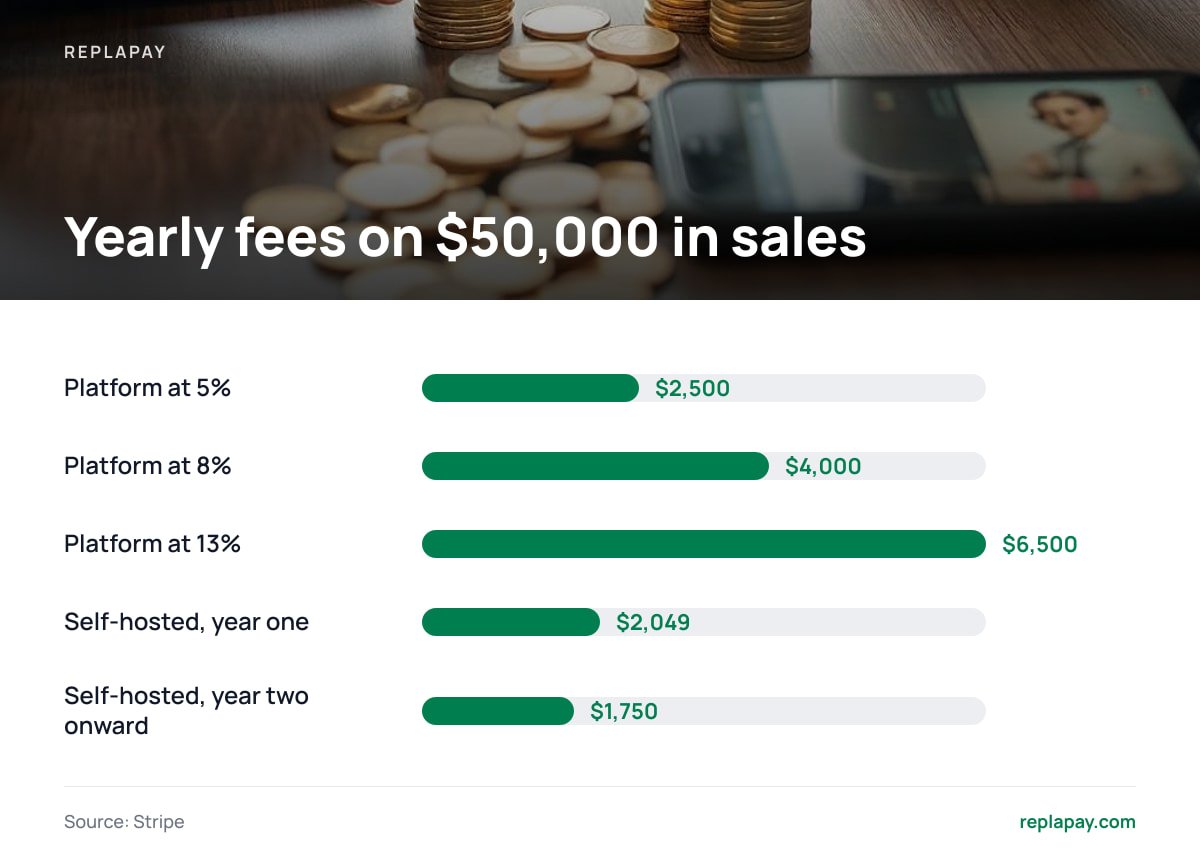
Percentages feel small until you multiply them. The table below assumes a $50 average order, domestic US cards, and Stripe's published standard rate of 2.9% + 30¢ per successful card charge for the self-hosted column. The self-hosted year-one figure adds a $299 one-time license.
| Annual sales (at $50/order) | Platform at 5% | Platform at 8% | Platform at 13% | Self-hosted, Stripe direct (year one, incl. $299) | Self-hosted, year two onward |
|---|---|---|---|---|---|
| $10,000 (200 orders) | $500 | $800 | $1,300 | $649 | $350 |
| $50,000 (1,000 orders) | $2,500 | $4,000 | $6,500 | $2,049 | $1,750 |
| $150,000 (3,000 orders) | $7,500 | $12,000 | $19,500 | $5,549 | $5,250 |
Hosting is not in the table. A small server or app host usually costs a few dollars to a few tens of dollars a month. Add that to the self-hosted column if you don't already pay for hosting.
At $50 a sale, Stripe's 2.9% + 30¢ comes to $1.75, or 3.5% all-in. Every point a platform charges above that is money you are paying for something other than processing the card.
The break-even point is simple to work out. Against an 8% platform, you save $2.25 per $50 sale, so a $299 license pays for itself after about 133 sales. Against a 5% platform, you save $0.75 per sale, and break-even takes about 400 sales. At the $10,000 level, year one is roughly a wash against a 5% platform. That is an honest reason not to switch if you are that small. Our article on selling digital products without a marketplace cut runs the same math for subscription products and higher price points.
The Trade-Off Nobody Advertises: Sales Tax, VAT, and Merchant of Record
The higher-fee platforms are not charging 5–13% for nothing. Many act as the merchant of record. Legally, they are the seller. They calculate, collect and remit sales tax and VAT in every jurisdiction, and they absorb the compliance work. When you self-host, that job moves to you.
US sales tax. In South Dakota v. Wayfair (2018), the US Supreme Court ruled that states can require remote sellers to collect sales tax based on economic activity, even if the seller has no physical presence there. Most states now set an economic nexus threshold, commonly $100,000 in sales into that state. Below the thresholds, many small creators owe little or nothing. Above them, you need to register and file.
EU VAT on digital products. EU VAT applies to e-books, courses, software and other electronically supplied services sold to consumers. The European Commission's One Stop Shop lets you register in a single member state and file one return covering sales across the whole EU, instead of registering in each country.
If you sell digital products from outside the EU, there is no VAT threshold. You owe EU VAT from your first sale to an EU consumer.
This is the strongest argument for staying on a merchant-of-record platform. If you sell $9 templates to buyers in 40 countries, the compliance work can cost more than the fees you would save. If most of your revenue comes from US buyers, or you sell business-to-business, the burden is much lighter. Our guide to who collects sales tax and VAT online walks through the thresholds country by country. Read it before you migrate, not after.
What No Subscription Checkout Software for Creators Should Include
A one-time license is only a good deal if the software does the job. These are the features to require before you pay.
Direct connection to your own Stripe account
Payments should land in your Stripe account, not in a pooled account that pays you out later. Direct integration means your money arrives on Stripe's normal payout schedule. It also means you keep your customer and transaction data. You can see disputes directly, and if you ever leave the software, your payment history stays with you.
Hosted card fields that keep your PCI scope small
The checkout should use Stripe's hosted payment fields, so raw card numbers never touch your server. Under the PCI Security Standards Council framework, merchants who fully outsource card data handling can usually validate with the shortest self-assessment questionnaire. Software that asks you to process card numbers on your own server creates far more compliance work and risk.
Payment links, not just embedded carts
Most creators sell through a link in an email, a video description or a social bio, not from a storefront page. Any product should be one shareable link away from a working checkout, with no cart page in between.
Crypto that settles to a wallet you control
If you accept crypto, the payment should go straight to your wallet. A processor should not custody it and convert it on your behalf. Bitcoin, Lightning and stablecoins each make sense for different buyers. The next section covers when each one is useful.
Delivery and receipts
The checkout should send the download link or license key automatically after payment, along with a receipt. If you have to deliver files by hand, you have replaced a fee with your own time.
For a feature-by-feature look at self-hosted options, see our buyer's comparison of self-hosted checkout tools.
Card vs. Crypto: Where Each Payment Rail Earns Its Place

Cards will be most of your revenue. Crypto is a useful addition for some audiences, but it won't replace cards.
Cards via Stripe. Cards are familiar to buyers, convert well, and come with built-in fraud tools. The downside is chargebacks. A buyer can dispute a charge weeks later, and Stripe charges a flat dispute fee, listed on its pricing page, whether you win or lose. International cards and currency conversion also add percentage surcharges on top of the base rate.
Bitcoin on-chain. There are no chargebacks. Network fees vary with congestion, and confirmation can take time. On-chain Bitcoin works for higher-ticket sales to buyers who already hold it. It is awkward for a $15 product.
Lightning. Lightning payments settle almost instantly and usually cost a fraction of a cent. That makes them practical for low-priced digital goods and tips, provided your buyers have Lightning-capable wallets.
Stablecoins. Stablecoins are pegged to the dollar, so you avoid price swings between the sale and your accounting. They are useful for international buyers whose cards get declined or carry heavy foreign-transaction fees.
There is a tax point you can't skip. The IRS treats digital assets as property, so receiving crypto as payment is income at its fair market value when you receive it. Selling or spending it later can trigger a separate gain or loss. Keep records of the dollar value at the moment of each sale.
Who Should Switch, and Who Should Stay Put

Our view: if you sell more than about $30,000 a year, most of it to US buyers or to businesses, and your current platform takes 8% or more, you should own your checkout. The savings are large, they compound every year, and the tax work is manageable.
Switch if:
- Your effective rate is above 7%. At that rate, break-even comes within the first few hundred sales.
- Your average order is $25 or more. Stripe's fixed 30¢ is a small share of the price, so you keep most of the difference.
- You already handle tax or sell mostly domestically. The merchant-of-record service you would give up isn't doing much for you.
Stay put if:
- You sell under about $10,000 a year. Year-one savings are close to zero.
- Your products cost under $10. On a $5 sale, Stripe's 2.9% + 30¢ alone is 8.9%. Self-hosting saves you much less than the headline percentages suggest.
- You sell globally to consumers and don't want to file VAT returns. In that case, you are getting real value from the platform's fee.
If you are also comparing link-based tools for social selling, our payment link tool comparison covers the options built specifically for creators.
How To Migrate Without Breaking Existing Customers
Most failed migrations go wrong because of things the seller forgot about. The fees are rarely the issue.
- Sort out tax first. Register where you need to before your first self-hosted sale. Registering afterward means paying uncollected tax out of your own margin.
- Keep the old platform live for past buyers. Existing customers have download links and license keys tied to the old system. Leave it running, with new sales turned off, for at least one full refund window.
- Move new sales one product at a time. Start with your highest-volume product, because that is where the savings show up fastest. Run it for two weeks and check that payouts, receipts and delivery all work.
- Update every link you've ever posted. Search your email sequences, video descriptions, pinned posts and bio links. Old links that still point to the old checkout keep paying the old fee.
- Set up subscription billing separately. If you sell memberships, move recurring subscribers deliberately. Card details stored on another platform's account usually can't be transferred automatically, so plan for customers to re-enter them.
Keep Every Sale Minus Stripe's Cut, for a One-Time $299
ReplaPay is a self-hosted checkout license that sends card payments straight to your own Stripe account and crypto payments (Bitcoin, Lightning and stablecoins) straight to your own wallet. You pay $299 once. After that, your per-sale cost is whatever Stripe or the network charges, with no percentage going to us. You get payment links for every product, 12 months of updates and 30 days of setup support. Our Stripe fee calculator lets you plug in your own prices and volume to see your break-even before you buy.
The caveat is the one this article has repeated throughout. ReplaPay does not act as your merchant of record. Sales tax and VAT registration and filing are your responsibility, and you need somewhere to host the software. If you sell low-priced products to consumers worldwide and don't want to file VAT, a merchant-of-record platform may still be worth its fee.
Frequently Asked Questions
Is there checkout software for creators with no monthly fee and no percentage cut?
Yes. Self-hosted checkout software sold as a one-time license connects to your own Stripe account, so the only per-sale cost is the processor's fee. Many tools advertised as "no monthly fee" still take a percentage of each sale, so check whether the vendor takes any cut beyond processing.
How many sales does it take for a one-time checkout license to pay for itself?
At a $50 average order, a $299 license breaks even after about 133 sales against a platform charging 8%, or about 400 sales against one charging 5%. Lower prices and lower platform rates push the break-even further out. Calculate it using your real effective rate from a recent payout report.
Do I have to handle sales tax and VAT if I self-host my checkout?
Yes. When you sell through your own Stripe account, you are the merchant of record, so collecting and remitting tax is your job. US states commonly set economic nexus thresholds around $100,000 in sales. Non-EU sellers owe EU VAT on digital products from the first sale to an EU consumer.
Is self-hosted checkout software PCI compliant?
It can be, if it uses Stripe's hosted payment fields so card numbers never touch your server. Merchants who fully outsource card handling this way can usually validate PCI compliance with the shortest self-assessment questionnaire. Avoid any software that processes raw card data on your own server.
Should creators accept crypto payments at checkout?
Crypto works well as an extra option alongside cards, not as a replacement. Lightning suits low-priced digital goods because fees are tiny, and stablecoins help international buyers whose cards get declined. In the US, the IRS treats crypto received as payment as income at its fair market value, so record the dollar value of every sale.
Sources
- Pricing & Fees | Stripe
- VAT One Stop Shop | European Commission
- PCI Security Standards Council | PCI Security Standards Council
- Digital Assets | Internal Revenue Service