

The hidden Stripe fees for small businesses are not secret. They are add-ons that never appear in the "2.9% + 30¢" headline: international card surcharges, currency conversion, dispute fees, instant payouts, and separate charges for billing and tax products. The distinction that matters is headline rate versus effective rate. On a $25 sale from a foreign card, the effective rate can reach 6.6%.
TL;DR:
- Stripe's headline US rate for online cards is 2.9% + 30¢, but the effective rate depends on order size, card country, currency, and disputes.
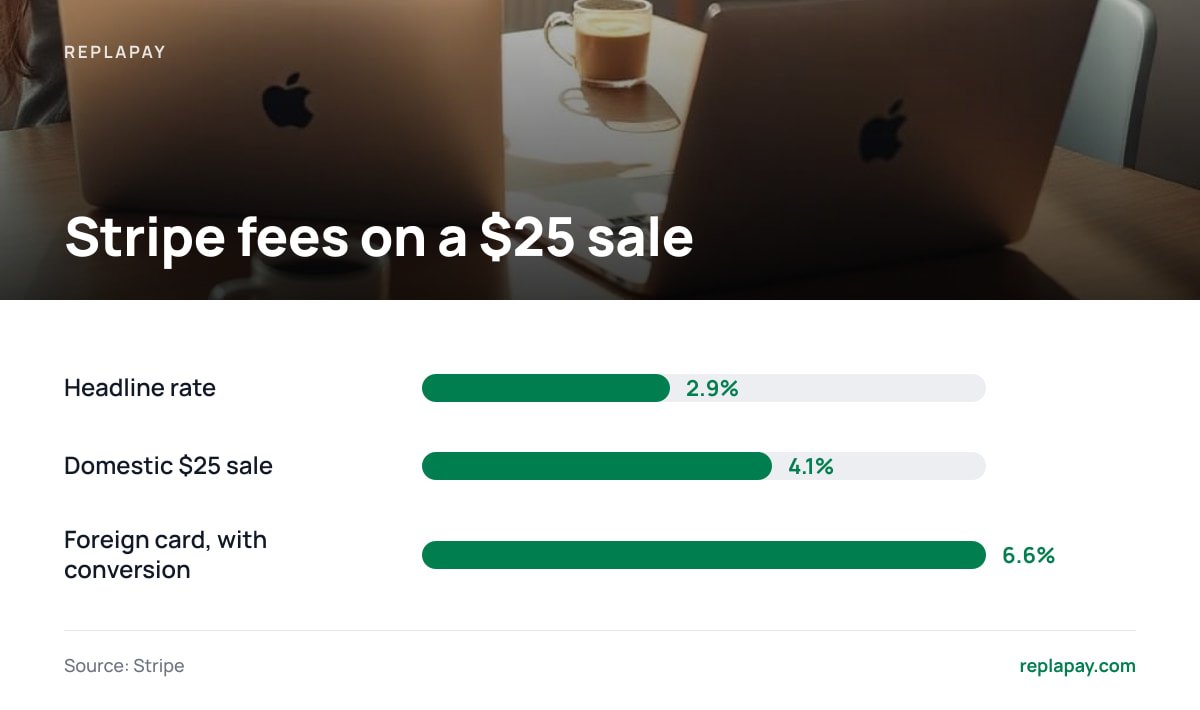
- A $25 domestic sale costs you about 4.1%. The same sale on a foreign card with currency conversion costs about 6.6%.
- Stripe is free to open but not free to use. There is no monthly fee on standard pricing, and you pay on every transaction.
- Refunds return the customer's money but not the processing fee, and every dispute carries its own fee on top of the lost sale.
- Calculate your real rate by dividing total fees by total gross volume over 90 days. If it's above 4.5% with a low average order, change your pricing or your checkout.
Table of Contents
- Hidden Stripe Fees for Small Businesses, Priced on a Real $25 Sale
- The Fee Lines Most Sellers Miss, and When Each One Bites
- Is Stripe Payment Free? Who Pays, and Why Sellers Add Surcharges
- Are Stripe Fees Subject to VAT, and What Else Hits Your Books?
- How To Find Where a Stripe Payment Came From
- Nonprofits, Subscriptions and Alternatives: Where the Math Changes
- A 20-Minute Audit To Find Your Real Stripe Rate
- Cut the Percentage Cut: A Checkout That Pays Straight Into Your Stripe Account
- Frequently Asked Questions
- Sources
Hidden Stripe Fees for Small Businesses, Priced on a Real $25 Sale
Start with the arithmetic, because the percentage hides the damage. Stripe's published US pricing lists 2.9% + 30¢ for a standard online card payment. On a $25 order that is 72.5¢ plus 30¢, or $1.025. That's 4.1% of the sale, not 2.9%.
Now add the surcharges that apply to some of your customers:
- International card. Stripe lists an extra 1.5% for cards issued outside the US. On $25 that's 37.5¢.
- Currency conversion. Stripe lists a further 1% when the payment must be converted. On $25 that's 25¢.
- Total. $1.025 + $0.375 + $0.25 = $1.65, or 6.6% of the sale.
A $25 sale paid by a foreign card with currency conversion costs 6.6%, more than double the 2.9% on the pricing page.
The fixed 30¢ is the part small sellers underestimate. On a $10 sale, 2.9% + 30¢ is 59¢, or 5.9%. On a $100 sale it's $3.20, or 3.2%. If your average order is under $30, your real rate is closer to 4-6% than to 3%. For more on the baseline math, see what percentage Stripe takes per transaction.
The Fee Lines Most Sellers Miss, and When Each One Bites
Every item below comes from the fee schedule Stripe publishes. Rates vary by country and change over time, so confirm yours against the current pricing page before you build a spreadsheet on them.
| Fee line | Typical US figure | When it hits you |
|---|---|---|
| Standard online card | 2.9% + 30¢ | Every card sale |
| International card | +1.5% | Customer's card issued outside your country |
| Currency conversion | +1% | Customer pays in a currency you don't settle in |
| Manually keyed card | +0.5% | You type card details in yourself |
| Bank debit (ACH) | 0.8%, capped at $5 | Larger tickets, where it often beats cards |
| Dispute | $15 per dispute | A customer contests the charge with their bank |
| Instant payout | About 1% of the payout | You want money today, not on the standard schedule |
| Tax calculation add-on | About 0.5% per transaction | You turn on Stripe's tax product |
Disputes cost more than the fee
Stripe's dispute documentation explains the process, and the real cost is the stack. You lose the sale amount, pay the dispute fee, and spend your own time assembling evidence. A disputed $25 sale can cost you $40 or more before you've answered a single email.
Refunds do not give the fee back
When you refund a customer, they get their money. Stripe generally keeps the processing fee. Refund a $25 order and you are out about $1.03 for a sale that no longer exists.
Refund a $25 order and you typically lose the $1.03 processing fee on top of the sale.
Billing and invoicing are separate meters
Stripe Billing charges an additional percentage of recurring-billing volume on top of payment processing, and invoicing has its own per-invoice component. If you run subscriptions, you pay two layers. Look up the current Billing rate in your dashboard before you price a plan, because that rate is the one most often missing from "Stripe cost per transaction" estimates.
Is Stripe Payment Free? Who Pays, and Why Sellers Add Surcharges

Is Stripe payment free? No. Opening an account costs nothing and standard pricing has no monthly fee, but every processed transaction carries a fee. Customers don't see it; you do.
Who pays Stripe fees? By default, you, the merchant. The fee comes out of your balance before payout, so a $25 sale deposits as about $23.97. Platforms built on Stripe's marketplace tools can pass fees to sellers or buyers, but that is a choice the platform makes.
Why do companies charge a surcharge? Because accepting cards has a real cost, and some merchants try to move it to the buyer. The legal picture is messier than the idea:
- United States. Card-network rules permit surcharging with conditions, and a few states restrict or ban it.
- United Kingdom. The Payment Services Regulations 2017 ban surcharges on most consumer card payments.
- European Union. PSD2 bars surcharging on most consumer cards.
My position: for a small seller with a mixed customer base, don't surcharge. It irritates buyers, triggers legal complexity across borders, and a visible fee on a $20 product costs you more in abandoned carts than it recovers. Raise the price by the amount of the fee and leave the checkout clean. A discount for paying by bank transfer or crypto is a friendlier version of the same idea.
Are Stripe Fees Subject to VAT, and What Else Hits Your Books?
Are Stripe fees subject to VAT? It depends on your country and on which Stripe product you use. In many jurisdictions, core payment processing is treated as a financial service and is generally exempt from VAT, while add-on software products can carry VAT. Your monthly Stripe invoice or fee statement shows whether VAT was charged on your account. If you are VAT-registered, treat that invoice as your source of truth and check it with your accountant, because getting it wrong in either direction creates a filing problem.
Two other records trip up small sellers:
- Gross versus net. In the US, payment processors report your gross card volume on Form 1099-K, before fees. Your income should be recorded at gross and your Stripe fees as a deductible expense. Booking only the net deposit understates both sides.
- Fees on fees. Currency conversion, disputes and add-on products usually appear as separate lines in the balance report. Reddit threads on this topic are mostly people discovering those separate lines for the first time.
How To Find Where a Stripe Payment Came From
How do I find out where a Stripe payment came from? Open the payment in your Dashboard under Payments. These fields tell you the source:
- Payment method details. These show the card brand, funding type (credit, debit, prepaid) and the country that issued the card. That country decides whether the 1.5% international fee applied.
- Source object. The payment page links to the originating Checkout Session, Payment Link, invoice or subscription, so you can tell a link in a social post from a subscription renewal.
- Metadata and description. If your checkout passes order IDs or campaign tags, they appear here. If yours doesn't, add them. They are free and make every later audit faster.
If you are on the other side and see an unfamiliar charge on your own card statement, the descriptor identifies the merchant, not Stripe. Contact that merchant first. If the payment is for a product you sell and the customer disputes it, matching the payment to the order record is how you win the dispute.
Nonprofits, Subscriptions and Alternatives: Where the Math Changes
Nonprofit fees
Stripe offers discounted processing for eligible nonprofits, but you generally have to apply and verify your status rather than receive it automatically. If you run a registered charity and still see standard rates, ask.
Subscription sellers
Stripe Billing plus processing plus tax add-ons can stack into a materially higher rate than the headline. If your plan is $9/month, the 30¢ alone is 3.3% before any percentage.
Card versus bank versus crypto
Stripe's standard US card pricing doesn't change between debit and credit, even though underlying interchange does. For tickets above roughly $150, ACH at 0.8% capped at $5 is usually cheaper. Crypto payments sent straight to your own wallet avoid card fees entirely, a setup covered in accepting crypto and card payments together.
Own Stripe versus a marketplace checkout
If a marketplace-style platform acts as your merchant of record, it often takes 5-13% all-in and handles sales tax for you. That convenience is real, and it's worth paying for at low volume. Run the numbers in Merchant of Record or Your Own Stripe? The Math at 3 Revenue Levels before deciding. My pick below roughly $1,000 a month in sales is the managed option, and above that I'd move to my own Stripe account.
A 20-Minute Audit To Find Your Real Stripe Rate

Do this once a quarter. You need a 90-day export of your balance transactions.
- Export the data. In the Dashboard, open Reports and download balance transactions with fee columns for the last 90 days.
- Total the numbers. Sum gross sales and sum all fees, including dispute fees and add-on charges.
- Divide. Fees divided by gross sales is your effective rate. Compare it to the 2.9% on the pricing page.
- Segment. Split by card country and by order size. The gap between your cheapest and priciest segment shows where to act.
- Act. Bundle low-price items, set minimum order values, add a bank-debit option for large tickets, and stop offering currencies you don't need.
Pro Tip: Sort your 90-day export by order value and find the smallest 20% of orders. Those typically produce more than their share of fee drag because of the fixed 30¢, and a $12 add-on that costs you 5.3% to process is often better bundled into a $29 tier. Raising prices by $2 on a $10 product cuts your effective rate from 5.9% to about 4.9% with no change to Stripe's pricing.
Cut the Percentage Cut: A Checkout That Pays Straight Into Your Stripe Account

Stripe's own fees are the floor, and you can't negotiate them away at small volume. The layer you can remove is the second one: the 5-13% marketplace commission stacked on top. ReplaPay is a self-hosted checkout you buy once for $299, which includes 12 months of updates and 30 days of setup support. It connects directly to your Stripe account, so card revenue lands with you and the only processing fee is Stripe's. It also supports Bitcoin, Lightning and stablecoin payments to your own wallet, and it includes a Stripe fee calculator so you can check your numbers against ours.
The math is simple. At $10,000 a month in $25 orders, Stripe's standard fees run about $410. A marketplace taking 8% would take $800. The $299 license pays for itself in under a month on that volume. The caveat is real: ReplaPay is not a merchant of record, so you handle sales tax and VAT yourself. If that sounds like too much, or you sell less than a few hundred dollars a month, a managed checkout is still the better choice. Compare the fee and tax math for leaving a marketplace checkout before you buy anything.
Frequently Asked Questions
Is Stripe payment free?
No. Opening a Stripe account is free and standard pricing has no monthly fee, but every card payment carries a per-transaction charge, typically 2.9% + 30¢ for US online cards. The fee is deducted from your balance before payout.
Why do companies charge a surcharge?
Companies add surcharges to recover the cost of accepting cards, which includes interchange, network and processor fees. Surcharges are restricted or banned for most consumer cards in the UK and EU, and limited in some US states, so check local rules before adding one.
How do I find out where a Stripe payment came from?
Open the payment in your Stripe Dashboard and review the payment method details for card country and type. Then check the linked Checkout Session, Payment Link, invoice or subscription, and any metadata. Adding order IDs or campaign tags to metadata makes this lookup instant later.
Are Stripe fees subject to VAT?
It depends on your country and the product. Core payment processing is often treated as an exempt financial service, while add-on software products can carry VAT. Your Stripe fee invoice shows what was charged on your account, so confirm with your accountant if you are VAT-registered.
Who pays Stripe fees?
By default the merchant pays. The fee is deducted from each payment before it reaches your balance. Platforms using Stripe's marketplace tools can choose to pass fees on to sellers or buyers.
Sources
- Stripe Pricing | Stripe
- Disputes | Stripe Documentation
- The Payment Services Regulations 2017 | UK Government, legislation.gov.uk
- Directive (EU) 2015/2366 (PSD2) | EUR-Lex, European Union
- Understanding Your Form 1099-K | Internal Revenue Service