

Self-hosted checkout software for creators is a licensed checkout you run on your own domain, with card payments routed into your own Stripe account and crypto into your own wallet. The trade is one license fee instead of a percentage of every sale. Marketplace checkouts take 5% to 13% per transaction and act as the merchant of record. Run your own checkout and you keep that margin, and you also inherit the tax registration and PCI duties that come with being the seller.
TL;DR:
- Self-hosted checkout means software you install and control; the payment itself still runs through a processor you connect.
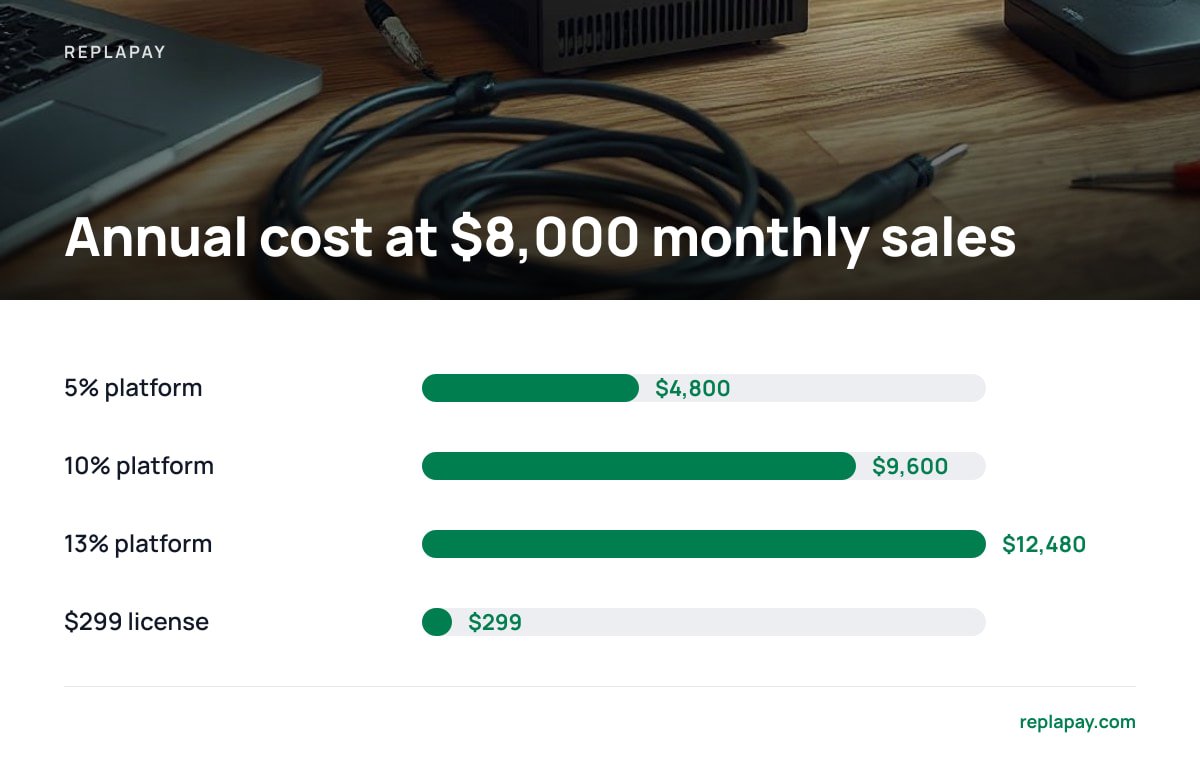
- Percentage platforms cost 5% to 13% per sale. At $8,000 a month, that is $4,800 to $12,480 a year against a $299 one-time license.
- Free billing apps exist under AGPL and MIT licenses, but the processor's per-transaction fee never goes away.
- Yes, open source software can be paid. A license governs what you may do with the code; it does not set the price.
- Self-hosting moves PCI scope and EU VAT registration onto you. Check your SAQ type and your EU sales volume before switching.
Table of Contents
- What Self-Hosted Checkout Software for Creators Means
- The Fee Math, and the Number That Decides It
- Is There a Free Billing App Available?
- Can Open Source Software Be Paid?
- What a Self-Hosted Payment Gateway Is, and What It Is Not
- How to Put a Payment System on Your Own Website
- The Two Costs Nobody Prices In: PCI Scope and EU VAT
- Where Self-Hosted Checkout Is the Wrong Call
- Get a Checkout You Own for $299, and the Limits Up Front
- Frequently Asked Questions
- Sources
What Self-Hosted Checkout Software for Creators Means
Self-hosted means the checkout pages, payment links, and order records run on infrastructure you control: your server, your domain, your database. The money still moves through a regulated processor. You connect your own Stripe account, the customer's statement names your business, and funds settle into your bank account rather than someone else's.
How you handle the card number decides most of your compliance load:
- Redirect checkout. Your software creates the payment session and sends the buyer to a processor-hosted page. Card data never touches your server, and your PCI questionnaire stays short.
- Hosted fields on your page. The card form sits on your domain, but the card fields are iframes served by the processor. The number still bypasses your server.
- Raw card collection. You store or transmit the number yourself. That puts you in the heaviest PCI tier, and for a one-person business the liability is not worth it.
Most creator stacks sit in the first two categories. Both let you own the customer relationship, the receipt, the license key, and the retry emails while the processor stays the processor.
If you are comparing specific tools, our buyer's comparison of self-hosted checkout options covers what separates them.
The Fee Math, and the Number That Decides It
Marketplace-style platforms charge between 5% and 13% of every sale and take on the role of merchant of record. That percentage is the entire argument for self-hosting, so price it against your real volume.
| Monthly sales | 5% platform, per year | 10% platform, per year | 13% platform, per year | $299 one-time license |
|---|---|---|---|---|
| $1,000 | $600 | $1,200 | $1,560 | $299 |
| $8,000 | $4,800 | $9,600 | $12,480 | $299 |
| $25,000 | $15,000 | $30,000 | $39,000 | $299 |
At $8,000 a month in sales, a 10% platform cut costs $9,600 a year. A $299 license costs $299, once.
Two adjustments keep that table honest. The processor's cut applies in every column, so subtract it before comparing columns. Stripe's published pricing lists 2.9% plus 30 cents per successful card charge on domestic US cards, and that charge exists whether you self-host or not. The license is also not the only cost of owning the checkout. Add hosting, an hour or two of setup, and your own maintenance time.
I would switch when the platform's annual cut climbs past roughly four times your total self-hosted cost. The full math on owning checkout software instead of renting it runs that comparison line by line, and this breakdown of commission fees covers the cases where a percentage platform still wins.
Is There a Free Billing App Available?
Yes, and two different things are being given away. Invoicing and billing apps released under the AGPL or MIT licenses cost nothing to download and nothing to run on your own server beyond hosting, typically $5 to $20 a month for a small VPS. Hosted free tiers cost nothing because the provider earns its money on payment processing, or on limits you will eventually hit.
The catch is that no billing app includes the cost of moving money. Every card payment still carries the processor's per-transaction fee whether the software is free, open source, or a $299 commercial license. Free billing software usually covers invoices, subscriptions, and expense tracking, and stops short of a full checkout with payment links, instant digital delivery, and license key issuing, which is the part creators need.
Can Open Source Software Be Paid?
Yes. Open source is a copyright license. It does not set a price. The GNU Project puts it plainly in Selling Free Software: the freedom to run, study, share, and modify a program is separate from what a distributor charges for copies or support, and charging is allowed. The GPL only requires that recipients receive the same freedoms you received.
That distinction matters when you shop. A one-time commercial license for closed-source software and an AGPL application with a paid support plan can both be legitimate purchases. Ask two questions instead of one: what does the license let you do with the code, and what happens to your checkout if you stop paying. With a self-hosted license, the software keeps running after the update window ends. With a hosted subscription, the checkout disappears when the subscription does.
What a Self-Hosted Payment Gateway Is, and What It Is Not
A payment gateway is the software that captures payment details, sends an authorization request to a processor, and records what came back. Self-hosting the gateway means that software runs on your server, under your domain, and writes to your database.
Self-hosting the gateway does not make you the processor. Stripe, or whichever acquirer you use, still holds the merchant account, still underwrites your business, still settles funds, still enforces the card network rules, and still handles chargebacks and disputes. Visa and Mastercard operate on the processor's membership, and no license purchase changes that.
What you gain is the list of things you no longer rent: the payment link, the product catalog, the receipt, the license key delivery, the webhook that fires when a payment succeeds. A flat-fee license such as ReplaPay's wires those pieces to your own Stripe account instead of charging you a percentage for the same work.
How to Put a Payment System on Your Own Website

The order of operations matters more than the tool you pick.
- Get a legal entity and a bank account. Stripe requires a business entity, a bank account in the business name, and a website that describes what you sell.
- Register a subdomain for payments. Something like pay.yourdomain.com keeps checkout separate from your main site and survives a hosting migration.
- Install the checkout software and keep API keys server-side. Keys in client-side JavaScript are visible to anyone who opens dev tools.
- Create one product and one payment link, then run a live test. Buy it with a real card for a dollar, confirm the order, the email, and the webhook, then refund the charge.
- Settle the tax question before you scale. Either configure tax handling inside the checkout or connect a tax service. Do this before you cross the thresholds in the next section.
The Stripe setup walkthrough covers API keys, webhook events, and test-mode steps in detail.
Pro Tip: A single headline processing rate never describes your real cost, because cross-border sales add surcharges on top of it. A $49 sale paid with a card issued outside the US, settled in a different currency, picks up the base rate plus an international card surcharge plus a conversion fee, landing close to $2.95, or about 6% of the sale. None of that disappears when you self-host. If most of your buyers are international, run your own card mix through a fee calculator before you assume a percentage platform is the expensive option.
The Two Costs Nobody Prices In: PCI Scope and EU VAT
PCI is the one people discover after launch. The PCI Security Standards Council publishes the self-assessment questionnaires that decide your paperwork. SAQ A applies when card data handling is fully outsourced to PCI-validated third parties. SAQ A-EP applies when your own site can affect the security of the transaction, which is the usual landing spot for a self-hosted checkout that uses hosted fields. If your software pulls raw card numbers onto your server, you are in SAQ D territory and its several hundred controls. Ask any vendor which SAQ type their integration is designed for, and get the answer in writing.
VAT is the second. Under the European Commission's One Stop Shop rules, cross-border business-to-consumer sales of digital services are taxed in the customer's member state once your total EU sales pass €10,000 in a year. Below that threshold you can charge your own country's VAT. Above it you register, charge the buyer's rate, and file.
The €10,000 EU threshold is cumulative across every member state combined. One sale into Ireland and one into Poland count against the same limit.
A merchant-of-record platform handles both of these for you, which is what those percentage fees buy. If you sell heavily into the EU and have no interest in a VAT registration, that single benefit can outweigh the fee difference.
Where Self-Hosted Checkout Is the Wrong Call
Self-hosting pays off at volume, in the right tax situation, with someone technical at the keyboard. It is the wrong call in these cases:
- You sell mostly to EU consumers and want nothing to do with VAT registration. An accountant plus filings costs more than the platform's cut at low volume.
- You are under about $1,000 a month in sales. Hosting, setup time, and the processor's base rate eat the savings.
- You need dunning, tax, fraud scoring, and dispute handling done for you. Self-hosted versions of each exist, and assembling them is a project.
- You sell through a store that forces its own billing. Some app stores and marketplaces do not allow external checkout at all.
The honest middle ground: if you sell worldwide in small volume, keep the platform for now and rerun this math at $5,000 a month.
Get a Checkout You Own for $299, and the Limits Up Front
ReplaPay sells a self-hosted checkout license for a one-time $299. It runs on your domain, connects to your own Stripe account, and accepts Bitcoin, Lightning, and stablecoins into a wallet you control. Payment links, card checkout, crypto checkout, 12 months of updates, and 30 days of setup support are included. If you are leaving a platform that takes a cut of every sale, the license pays for itself the first month you clear $3,000 in sales at a 10% rate.
The limits are worth stating as plainly as the price. The $299 does not include Stripe's processing fees, and it does not make you a merchant of record, so EU VAT registration and your PCI questionnaire stay your responsibility. Updates run for 12 months, and the license keeps working afterward if you choose not to renew. Check the current spec sheet, ours and any other vendor's, for the SAQ type an integration is built for before you buy.
Frequently Asked Questions
Is there a free billing app available?
Yes. Invoicing and billing apps released under AGPL or MIT licenses cost nothing to download or self-host, and hosted free tiers exist as well. The software license is free, but hosting runs $5 to $20 a month and every card payment still carries the processor's per-transaction fee.
Can open source software be paid?
Yes. Open source is a copyright license, not a price. The GNU Project states that free software means freedom to run, study, share, and modify, and that distributors may charge for copies or support. Plenty of companies sell paid open-source software.
What is a self-hosted payment gateway?
It is the software layer on your own server that captures payment details, sends the authorization request to a processor, and records the result. The processor still holds the merchant account, settles the funds, and handles chargebacks.
How do I put a payment system on my own website?
Open a processor account, install the checkout software on a payment subdomain, keep API keys server-side, then create a product and payment link. Run one live test purchase and refund it before launch, and confirm your PCI self-assessment type if card fields appear on your page.
How much does self-hosted checkout software cost?
One-time licenses generally run from $99 to $500, with $299 a common single-site price. Add hosting, the processor's per-transaction rate, and your own setup time to get the true first-year number.
Will self-hosting remove my Stripe fees?
No. Stripe's base US rate is 2.9% plus 30 cents per successful card charge, with added surcharges for international cards and currency conversion. Self-hosting removes a platform's percentage, not the processor's.
Sources
- Selling Free Software | GNU Project
- PCI Security Standards Council | PCI SSC
- Stripe Pricing | Stripe
- Taxation and Customs Union: VAT on e-commerce | European Commission