

The cheapest way to sell digital downloads online is to charge customers through your own payment processor account instead of a marketplace that takes a percentage of every sale. Direct card processing costs 2.9% plus 30 cents per domestic US transaction on Stripe's standard pricing. Marketplace-style platforms commonly take 5% to 13% once processing is included. The catch is that below roughly $6,000 a year in sales, setup costs and tax paperwork can erase the difference.
TL;DR:
- Paying your processor directly costs about 4% on a $25 sale. Marketplace-style checkouts commonly cost 5% to 13% of the same sale.
- At $50,000 a year in sales, owning your checkout keeps roughly $2,500 more in year one than a 10% all-in platform, and more in every year after.
- The fixed 30-cent fee punishes cheap products. A $5 download loses nearly 9% to processing alone.
- Marketplaces that act as merchant of record handle EU VAT and US sales tax for you. Selling direct makes that your job.
- Under about $6,000 a year, a marketplace or a plain payment link is the sensible choice. Above that, owning your checkout usually wins.
Table of Contents
- The Cheapest Way to Sell Digital Downloads Online Depends on Your Annual Sales
- What You Actually Pay: Processing, Platform Cut, and the Fees Nobody Advertises
- The Real Math at $10,000, $50,000, and $100,000 a Year
- Why Cheap Products Get Hit Hardest, and How to Fix It
- The Tax Question Marketplaces Answer for You
- Card vs. Crypto: Where Each Option Actually Saves Money
- Which Setup We'd Pick at Each Revenue Level
- Keep the Platform Cut: A $299 Checkout You Own Outright
- Frequently Asked Questions
- Sources
The Cheapest Way to Sell Digital Downloads Online Depends on Your Annual Sales
There is no single cheapest option. Two kinds of costs are competing. Percentage fees grow with every sale. Fixed costs, such as a software license or hosting, stay flat no matter how much you sell. A marketplace that takes 10% is the cheapest choice when you sell $2,000 a year, and an expensive one when you sell $80,000.
Think of it this way: you are not choosing a platform, you are choosing a cost curve. Percentage-based checkouts are cheap to start and get more expensive as you grow. Self-hosted checkouts cost something up front and then charge you only raw processing fees for as long as you use them.
If you already sell steadily, the question to ask is not "which tool is cheapest?" It is "at what revenue does a fixed cost beat a percentage?" The rest of this article works out that number.
What You Actually Pay: Processing, Platform Cut, and the Fees Nobody Advertises

Every digital sale passes through up to three layers of fees. Most sellers only look at the first one.
Payment processing
Card processing is unavoidable. Whatever checkout you use, a card network and a processor take a cut. On Stripe's published pricing, a standard domestic US card charge costs 2.9% + 30¢.
International cards cost more. Stripe adds 1.5% for international cards and another 1% when currency conversion is required. If a large share of your buyers are overseas, your real processing rate is closer to 4.4% to 5.4% before the fixed fee.
The platform cut
This is the layer you can remove. Marketplace-style checkouts add their own percentage, and sometimes a per-transaction fee, on top of processing. Some bundle processing into one headline rate. Others list it separately. Either way, the all-in cost commonly lands between 5% and 13% of each sale.
Disputes, refunds, and payouts
Chargebacks carry a flat penalty. Stripe's dispute documentation explains that a dispute fee applies when a customer contests a charge. Digital goods attract "I didn't receive it" claims more often than you'd expect.
Refunds don't return the processing fee. On most processors, refunding a sale does not give you back the original fee. A high refund rate quietly raises your effective cost.
The Real Math at $10,000, $50,000, and $100,000 a Year
The figures below assume a $25 average sale and domestic US cards at 2.9% + 30¢, which works out to about 4.1% per sale. The marketplace column uses a 10% all-in rate. The self-hosted column adds a one-time $299 license and $6 a month for a small server.
| Annual sales | Sales count | Marketplace (10% all-in) | Direct processing only | Self-hosted, year 1 (incl. $299 + hosting) | Year-1 savings vs. marketplace |
|---|---|---|---|---|---|
| $10,000 | 400 | $1,000 | $410 | $781 | $219 |
| $50,000 | 2,000 | $5,000 | $2,050 | $2,421 | $2,579 |
| $100,000 | 4,000 | $10,000 | $4,100 | $4,471 | $5,529 |
From year two onward, the $299 license is already paid. Your only extra cost over raw processing is hosting. At $50,000 a year, that means roughly $2,900 back in your pocket every year.
At a 10% platform cut and a $25 average sale, a $299 self-hosted checkout pays for itself, hosting included, at about $6,300 in annual sales.
The break-even depends heavily on your current all-in rate. If your platform really costs you 6% including processing, the gap shrinks to about 2% of revenue, and break-even rises to roughly $18,500. To see exactly what you're paying now, pull your last three months of payouts and divide total fees by gross sales. Don't use the advertised rate. For a fuller treatment of this calculation, see The Real Math on Selling Digital Products Without a Marketplace Cut.
Why Cheap Products Get Hit Hardest, and How to Fix It
The fixed 30-cent fee is barely noticeable on a $50 course. On cheap downloads it dominates the cost.
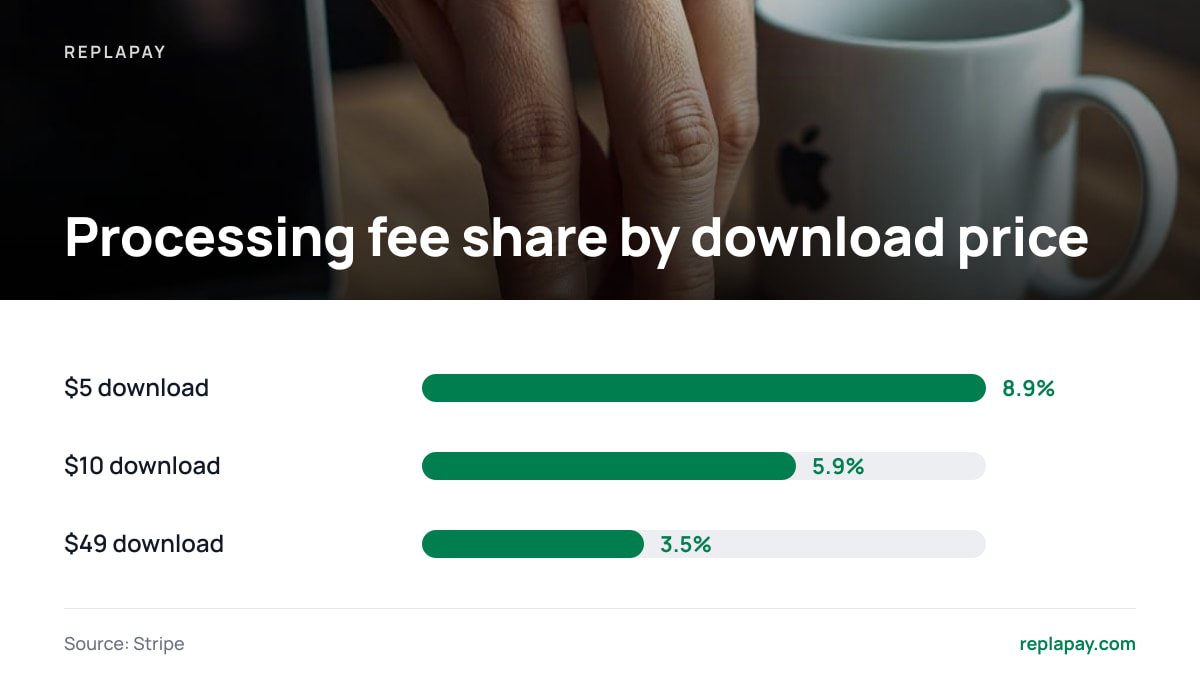
- $5 download. You pay 14.5¢ in percentage fees plus 30¢ fixed, for 44.5¢ total. That is 8.9% gone before any platform takes its share.
- $10 download. You pay 59¢, or 5.9%.
- $49 download. You pay $1.72, or 3.5%.
If you stack a 5% platform fee on top of a $5 sale, you lose around 14%.
Pro Tip: If your catalog is full of $3 to $7 items, the biggest saving is usually not switching platforms. It is changing how you price. Bundle five presets into one $19 pack, or offer a $15 "everything" tier, and the fixed fee drops from about 9% of the sale to under 2%. Do this before you migrate anything. Then compare platforms again with your new average order value.
The other fix for micro-purchases is Bitcoin's Lightning Network, covered in the crypto section below.
The Tax Question Marketplaces Answer for You

This is the part most "cheapest way" articles skip, and it is the most important caveat in the whole comparison.
Many marketplace checkouts act as merchant of record. Legally, they are the seller. They calculate, collect, and file sales tax and VAT on your behalf. When you sell direct through your own Stripe account, you are the merchant of record, and the obligations fall to you.
- EU VAT. Digital services sold to EU consumers are taxed at the buyer's country rate. The EU VAT One Stop Shop lets you register once and file a single quarterly return instead of registering in every member state. Sellers based outside the EU get no minimum threshold. VAT is owed from the first sale.
- UK VAT. HMRC guidance on digital services sets out how VAT applies to digital services supplied to UK consumers, including those from overseas sellers.
- US sales tax. Since the Supreme Court's South Dakota v. Wayfair decision in 2018, states can require remote sellers to collect sales tax once they pass economic thresholds. Whether digital downloads are taxable varies by state.
Sellers outside the EU have no VAT threshold for digital sales to EU consumers. If you sell direct, the obligation starts with your first euro.
Tax automation tools exist, including Stripe's own add-on, but they charge extra per transaction. Include them in your math if you sell internationally in volume. Even with that cost added, a direct setup usually still beats a 10% cut above mid-five-figure revenue. It does not beat it for free.
Card vs. Crypto: Where Each Option Actually Saves Money
Cards are what most buyers expect. Crypto is a cost-saving option for the share of buyers who already use it.
- Cards through your own Stripe account. You pay 2.9% + 30¢ domestically and nothing more. Chargebacks remain possible.
- On-chain Bitcoin. You pay no processor percentage, but the buyer pays a network fee that rises when the network is congested. That makes it a poor fit for small sales.
- Lightning Network. Fees are typically a tiny fraction of a cent, and there is no meaningful fixed fee. This is the cheapest rail available for a $3 download.
- Stablecoins. These are dollar-pegged, which removes price-swing risk. Network fees depend on the chain you use.
No chargebacks on crypto. Crypto payments can't be reversed by the payer's bank. For digital products, this eliminates the "friendly fraud" disputes that cost card sellers money.
The honest limit: most buyers will still pay by card. Offer crypto alongside cards, not instead of them, and expect it to cover a minority of orders.
Which Setup We'd Pick at Each Revenue Level

Here is where we land, based on the math above.
- Under $6,000 a year: stay simple. Use a marketplace, or a plain Stripe Payment Link that redirects to a download page. Payment Links add nothing beyond processing fees. They do lack license keys and protection against link-sharing, and you handle tax yourself. At this level, your time matters more than a few hundred dollars.
- $6,000 to $25,000 a year: run your actual numbers. If your all-in platform rate is 9% or higher, switching pays back within the year. If it is closer to 6%, the case is weaker unless you also value owning your customer data.
- Above $25,000 a year: own your checkout. The savings run into thousands every year and compound. A one-time license beats both percentage fees and monthly software subscriptions. We break that down in One-Time Checkout Software vs. Subscriptions: The Cost Math.
If you're comparing specific self-hosted tools, our buyer's comparison of self-hosted checkout tools covers what to check before you commit.
Keep the Platform Cut: A $299 Checkout You Own Outright
ReplaPay is self-hosted checkout software. Payments go straight into your own Stripe account and crypto wallet, so the only fees you pay are raw processing fees. Card payments run through your Stripe account at Stripe's rates. Crypto payments support Bitcoin, Lightning, and stablecoins, with no chargebacks. You get payment links for both. The license is a one-time $299 and includes 12 months of updates plus 30 days of setup support. Our Stripe fee calculator shows exactly what you'd keep at your own price point.
The caveat: ReplaPay is not a merchant of record. VAT, sales tax, and hosting are your responsibility, as they are with any direct setup. If you sell under about $6,000 a year, or don't want to handle tax filings, a marketplace may genuinely serve you better. Check our spec sheet against your needs before you buy.
Frequently Asked Questions
What is the cheapest way to sell digital downloads if I only make a few sales a month?
At low volume, a Stripe Payment Link that redirects buyers to a download page costs nothing beyond processing fees of 2.9% plus 30 cents per domestic US card charge. A marketplace is also reasonable, because the dollar difference is small at that scale. Paid software usually isn't worth it until your sales reach several thousand dollars a year.
How much do marketplace checkout platforms really take from each sale?
Once payment processing is included, marketplace-style checkouts commonly take between 5% and 13% of each sale. The advertised rate often leaves out processing or per-transaction fees. To find your real rate, divide your total fees by your gross sales over a few months of payouts.
Do I have to collect VAT or sales tax if I sell digital downloads directly?
Usually yes. When you sell through your own payment account, you are the merchant of record. Sellers outside the EU owe EU VAT on digital sales to EU consumers from the first sale, typically filed through the One Stop Shop. In the US, states may require remote sellers to collect sales tax once they pass economic thresholds.
Why do cheap digital products cost more to sell?
Card processing includes a fixed fee of about 30 cents per transaction, which takes a large share of small sales. On a $5 download, processing alone takes nearly 9%, compared with about 3.5% on a $49 product. Bundling cheap items into higher-priced packs is the most effective fix.
Is accepting crypto actually cheaper than accepting cards?
For small purchases, Bitcoin's Lightning Network is typically far cheaper than cards, with fees well under a cent and no fixed charge. Crypto payments also can't be charged back. Most buyers still prefer cards, though, so crypto works best as an added option rather than a replacement.
Sources
- Pricing & Fees | Stripe
- Disputes and fraud documentation | Stripe
- VAT One Stop Shop | European Commission
- VAT rules for supplies of digital services to consumers | HM Revenue & Customs (GOV.UK)